AWS SSM Agent - Connection Error
Updated
•3 min read
When trying to access EC2 instance using AWS ssm cli or SSM connect manager and get error Plugin with name Standard_Stream not found. Step name: Standard_Stream. No worry, this post shows you how to troubleshoot
What’s In This Document
🚀 What is the error
- We got error when trying access EC2 instance using SSM and AWS CLI
⚡ $ aws ssm start-session --target i-123abc456efd789xx --region ap-northeast-2

Starting session with SessionId: userdev-004f77465f262084d


SessionId: userdev-004f77465f262084d : Plugin with name Standard_Stream not found. Step name: Standard_Stream
- Even from console
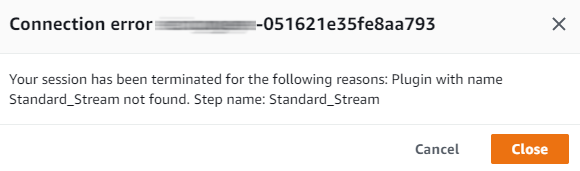
- Do we need to install Session Manager plugin? It's optional but not the rootcause yet (Optional) Install the Session Manager plugin for the AWS CLI
🚀 Investigate and Apply solution
So far you need to access the EC2 using SSH with key-pem to debug (ask your admin)
Running
tail -fgot issuetail: inotify resources exhausted tail: inotify cannot be used, reverting to pollingRestart ssm-agent service also got issue
No space left on devicebut it's not about disk space[root@env-test ec2-user]# systemctl restart amazon-ssm-agent.service Error: No space left on device [root@env-test ec2-user]# df -h |grep dev devtmpfs 32G 0 32G 0% /dev tmpfs 32G 0 32G 0% /dev/shm /dev/nvme0n1p1 100G 82G 18G 83% /
So the error itself means that system is getting low on inotify watches, that enable programs to monitor file/dirs changes. To see the currently set limit (including output on my machine)
⚡ $ cat /proc/sys/fs/inotify/max_user_watches
8192
- Check which processes using
inotifyto improve your apps or increasemax_user_watches
# for foo in /proc/*/fd/*; do readlink -f $foo; done | grep inotify | sort | uniq -c | sort -nr
      5 /proc/1/fd/anon_inode:inotify
      2 /proc/7126/fd/anon_inode:inotify
      2 /proc/5130/fd/anon_inode:inotify
      1 /proc/4497/fd/anon_inode:inotify
      1 /proc/4437/fd/anon_inode:inotify
      1 /proc/4151/fd/anon_inode:inotify
      1 /proc/4147/fd/anon_inode:inotify
      1 /proc/4028/fd/anon_inode:inotify
      1 /proc/3913/fd/anon_inode:inotify
      1 /proc/3841/fd/anon_inode:inotify
      1 /proc/31146/fd/anon_inode:inotify
      1 /proc/2829/fd/anon_inode:inotify
      1 /proc/21259/fd/anon_inode:inotify
      1 /proc/1934/fd/anon_inode:inotify
- Notice that the above
inotifylist include PID of ssm-agent processes, it explains why we got issue with SSM whenmax_user_watchesreached limit
# ps -ef |grep ssm-ag
root      3841     1  0 00:02 ?        00:00:05 /usr/bin/amazon-ssm-agent
root      4497  3841  0 00:02 ?        00:00:33 /usr/bin/ssm-agent-worker
- Final Solution: Permanent solution (preserved across restarts)
echo "fs.inotify.max_user_watches=1048576" >> /etc/sysctl.conf
sysctl -p
- Verify:
⚡ $ aws ssm start-session --target i-123abc456efd789xx --region ap-northeast-2

Starting session with SessionId: userdev-03ccb1a04a6345bf5
sh-4.2$
🚀 Conclusion
This issue comes from EC2 instance not about SSM agent
Go to 🔗 to undestanding SSM agent in 2 minutes.