CI/CD With ArgoCD On AWS EKS Cluster

Abstract
Argo CD is a declarative, GitOps continuous delivery tool for Kubernetes. The core component of Argo CD is the Application Controller, which continuously monitors running applications and compares the live application state against the desired target state defined in the Git repository. This post helps you hands-on deploying argo-cd on AWS EKS and suggests a flow of CI/CD on argo-cd
Table Of Contents
🚀 Install Argo-CD and set up
1. Using helm chart to install Argo CD
- Use
NodePortatserver.service.typefor usingingresslater
helm repo add argo https://argoproj.github.io/argo-helm
helm install --name argo-cd argo/argo-cd \
  --set server.service.type=NodePort
- Check pods
$ kubectl get pod -n argocd
NAME                                  READY   STATUS    RESTARTS   AGE
argocd-application-controller-0       1/1     Running   0          46h
argocd-dex-server-5b64997f-65jwz      1/1     Running   0          46h
argocd-redis-747b678f89-9v6hv         1/1     Running   0          60m
argocd-repo-server-84455d7b68-t2ssj   1/1     Running   0          60m
argocd-server-5f59b44d5c-dscv8        1/1     Running   0          46h
2. Install Argo CD CLI
VERSION=$(curl --silent "https://api.github.com/repos/argoproj/argo-cd/releases/latest" | grep '"tag_name"' | sed -E 's/.*"([^"]+)".*/\1/')
sudo curl --silent --location -o /usr/local/bin/argocd https://github.com/argoproj/argo-cd/releases/download/$VERSION/argocd-linux-amd64
sudo chmod +x /usr/local/bin/argocd
3. Argocd Temporary redirect (https://github.com/argoproj/argo-cd/issues/2953)
The problem is that by default Argo-CD handles TLS termination itself and always redirects HTTP requests to HTTPS. Combine that with an ingress controller that also handles TLS termination and always communicates with the backend service with HTTP and you get Argo-CD's server always responding with a redirect to HTTPS.
So one of the solutions would be to disable HTTPS on Argo-CD, which you can do by using the
--insecureflag on argocd-server.
spec:
  containers:
  - command:
    - argocd-server
    - --staticassets
    - /shared/app
    - --insecure
4. Argocd ingress
apiVersion: networking.k8s.io/v1beta1
kind: Ingress
metadata:
  annotations:
    alb.ingress.kubernetes.io/backend-protocol: HTTP
    alb.ingress.kubernetes.io/certificate-arn: arn:aws:acm:ap-northeast-2:123456789012:certificate/xxxx
    alb.ingress.kubernetes.io/group.name: dev
    alb.ingress.kubernetes.io/group.order: "4"
    alb.ingress.kubernetes.io/listen-ports: '[{"HTTPS":443}]'
    kubernetes.io/ingress.class: alb
  labels:
    dev: argocd
  name: argocd
  namespace: argocd
spec:
  rules:
    - host: argocd.cloudopz.co
      http:
        paths:
          - backend:
              serviceName: argocd-server
              servicePort: 80
5. Login argocd
- For the first time login, we get the initial admin password
ARGO_PWD=`kubectl -n argocd get secret argocd-initial-admin-secret -o jsonpath="{.data.password}" | base64 -d`
argocd login argocd.cloudopz.co --username admin --password $ARGO_PWD --insecure --grpc-web

CONTEXT_NAME=`kubectl config view -o jsonpath='{.current-context}'`

argocd cluster add $CONTEXT_NAME
INFO[0001] ServiceAccount "argocd-manager" already exists in namespace "kube-system"
INFO[0001] ClusterRole "argocd-manager-role" updated
INFO[0001] ClusterRoleBinding "argocd-manager-role-binding" updated
Cluster 'https://ID.gr7.ap-northeast-2.eks.amazonaws.com' added
Note: If login failed due to FATA[0001] rpc error: code = Unknown desc = Post "https://null:443/cluster.ClusterService/Create": dial tcp: lookup null on 10.3.0.2:53: no such host going to restart all argocd services
$ argocd cluster list
SERVER                                                                         NAME        VERSION  STATUS   MESSAGE
https://ID.gr7.ap-northeast-2.eks.amazonaws.com                                dev                  Unknown  Cluster has no application and not being monitored.
https://kubernetes.default.svc                                                 in-cluster           Unknown  Cluster has no application and not being monitored.
6. Add argocd bash completion
echo "source <(argocd completion bash)" >> ~/.bash_profile
7. Deploy app
kubectl create namespace dev
argocd app create dev --repo https://gitlab.cloudopz.co/k8s-dev.git --path kubernetes --dest-server https://ID.gr7.ap-northeast-2.eks.amazonaws.com --dest-namespace dev

$ argocd app list
NAME   CLUSTER                                                                        NAMESPACE  PROJECT  STATUS     HEALTH   SYNCPOLICY  CONDITIONS  REPO                                          PATH   TARGET
dev   https://ID.gr7.ap-northeast-2.eks.amazonaws.com                                 dev        default  OutOfSync  Healthy  Auto-Prune  <none>      https://gitlab.cloudopz.co/devops/k8s-dev.git  dev   HEAD
8. Enable auto sync and prune
argocd app set dev --sync-policy automated
argocd app set dev --auto-prune
9. Private repo: use https with user and password for login
argocd repo add https://gitlab.cloudopz.co/argoproj/argocd-example-apps --username <username> --password <password>
11. Add a new user to argo-cd
- Update argocd-cm configmap directly or use
values.yamland then runhelm upgrade --values values.yamlor use sample file
  accounts.myacc: apiKey, login
  accounts.myacc.enabled: "true"
kubectl apply -f dist/argocd-cm.yamland Then change password, the current password is the admin's one
argocd account update-password --account myacc
- Get account list
$ argocd account list
NAME     ENABLED  CAPABILITIES
admin    true     login
myacc  true     apiKey, login
🚀 CI/CD with Argo-CD
Pre-requiste: It assumes you know about
cdk8s, Gitlab pipeline jobs, AWS ECRFlow
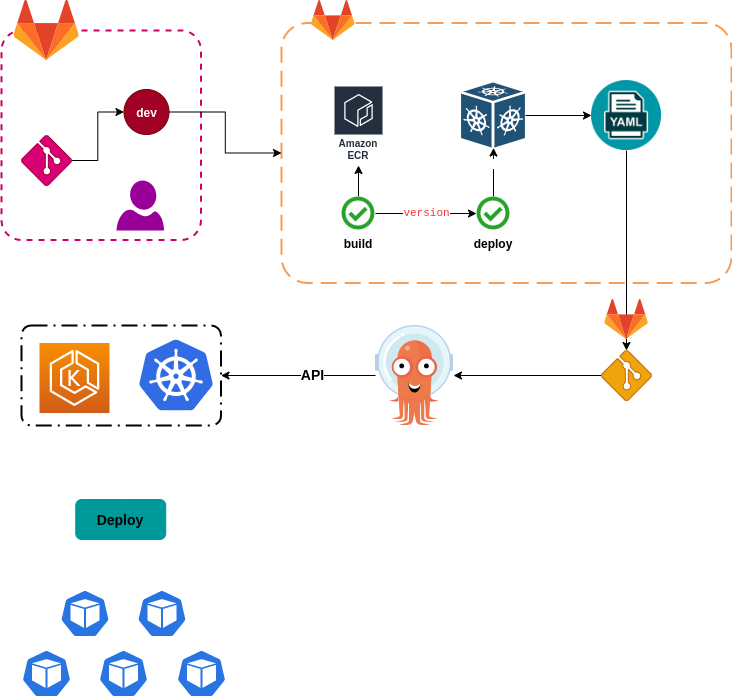
Describe the flow step-by-step:
We already register to Argo-CD the project
k8s-devwhich contains applications deployment/statefulset yaml files where Argo-CD will track and sync them to EKS clusterWhen the user push a commit to Gitlab, gitlab-runner triggers the job to compile and build the image, then tag the version and push it to AWS ECR
Gitlab runner triggers the deploy job after finishing job build, the deploy job uses
cdk8sto create yaml files from python code, then it creates a commit with the new yaml file and pushes the commit to the projectk8s-devArgo-CD triggers sync and deploys the new yaml files to k8s application
Some notes:
Checkout CDK8S Example to know more about creating k8s yaml files as code
You need to install CDK8S for gitlab-runner to build yaml files or you can use cdk8s docker image
Sample Dockerfile
 FROM python:3.9-alpine

 RUN apk --no-cache add yarn npm
 RUN yarn global add cdk8s-cli && yarn cache clean
 RUN mkdir /deployments && mkdir /build
 WORKDIR /deployments
 RUN pip install pipenv && \
     cd /build; cdk8s init python-app

 ADD entrypoint-python.sh /entrypoint.sh

 RUN chmod +x /entrypoint.sh


 ENTRYPOINT ["/entrypoint.sh"]
- Sample deploy phase in
gitlab-ci.yaml
deploy:
  stage: deploy
  script:
    - echo "Deploy app"
    - branch_name=$(echo $CI_COMMIT_REF_NAME | sed 's/\//-/g')
    - name_space=$(echo $branch_name | cut -d'-' -f2)
    - app_version="$branch_name-$CI_PIPELINE_ID"
    - cdk_image="123456789012.dkr.ecr.ap-northeast-2.amazonaws.com/cdk8s-python:latest"
    - git clone git@gitlab.cloudopz.co:devops/cdk8s.git
    - cd cdk8s
    - docker run -v $(pwd)/deployments:/deployments ${cdk_image}
    - cp app/main.py app/app.py app/appsch.py deployments
    - docker run -v $(pwd)/deployments:/deployments -e APP_VERSION=${app_version} -e NAMESPACE=${name_space} ${cdk_image} synth
    - temp_dir=$(mktemp -d /tmp/k8s-dev-XXXX)
    - git clone git@gitlab.cloudopz.co:devops/k8s-dev.git ${temp_dir}
    - cp deployments/dist/app.k8s.yaml ${temp_dir}/${name_space}/app.yaml
    - cd ${temp_dir}
    - git add ${name_space}/app.yaml
    - git commit -m "Deploy app version ${app_version} for ${branch_name}"
    - result=$(git push origin master || echo "False")
    - |
      if [ "$result" == "False" ]; then
        echo "A gap between two push, let's pull and retry"
        git pull
        git push origin master
      fi
    - rm -r ${temp_dir}