RDS Auto Restart Protection

Abstract
Customers needing to keep an Amazon Relational Database Service (Amazon RDS) instance stopped for more than 7 days, look for ways to efficiently re-stop the database after being automatically started by Amazon RDS. If the database is started and there is no mechanism to stop it; customers start to pay for the instance’s hourly cost
Stopping and starting a DB instance is faster than creating a DB snapshot, and then restoring the snapshot.
This blog provides a step-by-step approach to automatically stop an RDS cluster with fully serverless and using Pulumi to create AWS resources
Table Of Contents
🚀 Overview of Pulumi
Why Pulumi? Pulumi enables developers to write infrastructure as code in their favourite languages, such as TypeScript, JavaScript, Python, and Go.
Here is general steps-by-step to create pulumi project and its stack
- Create new project
pulumi new aws-typescript
- Set up aws profile
- When creating/init a stack
pulumi stack initthePulumi.<stack-name>.yamlis not created so we have to set the config ourselves
pulumi config set aws:region ap-northeast-2
pulumi config set aws:profile myprofile
- Pulumi bash completion
- Feel lazy about typing? Setup bash completion for pulumi
pulumi gen-completion bash > /etc/bash_completion.d/pulumi
- Update
.bashrcfor alias
# add Pulumi to the PATH
export PATH=$PATH:$HOME/.pulumi/bin
alias plm='/home/vudao/.pulumi/bin/pulumi'
complete -F __start_pulumi plm
- Import existing resources
- For creating a new RDS cluster to test the flow, we can import the existing Security group or anything to the stack
pulumi import aws:ec2/securityGroup:SecurityGroup vpc_sg sg-13a02c7a
- Refresh the stack
- If we manually delete the resources which are managed by the stack we can run refresh to update the stack resource status
pulumi refresh
🚀 Solution overview
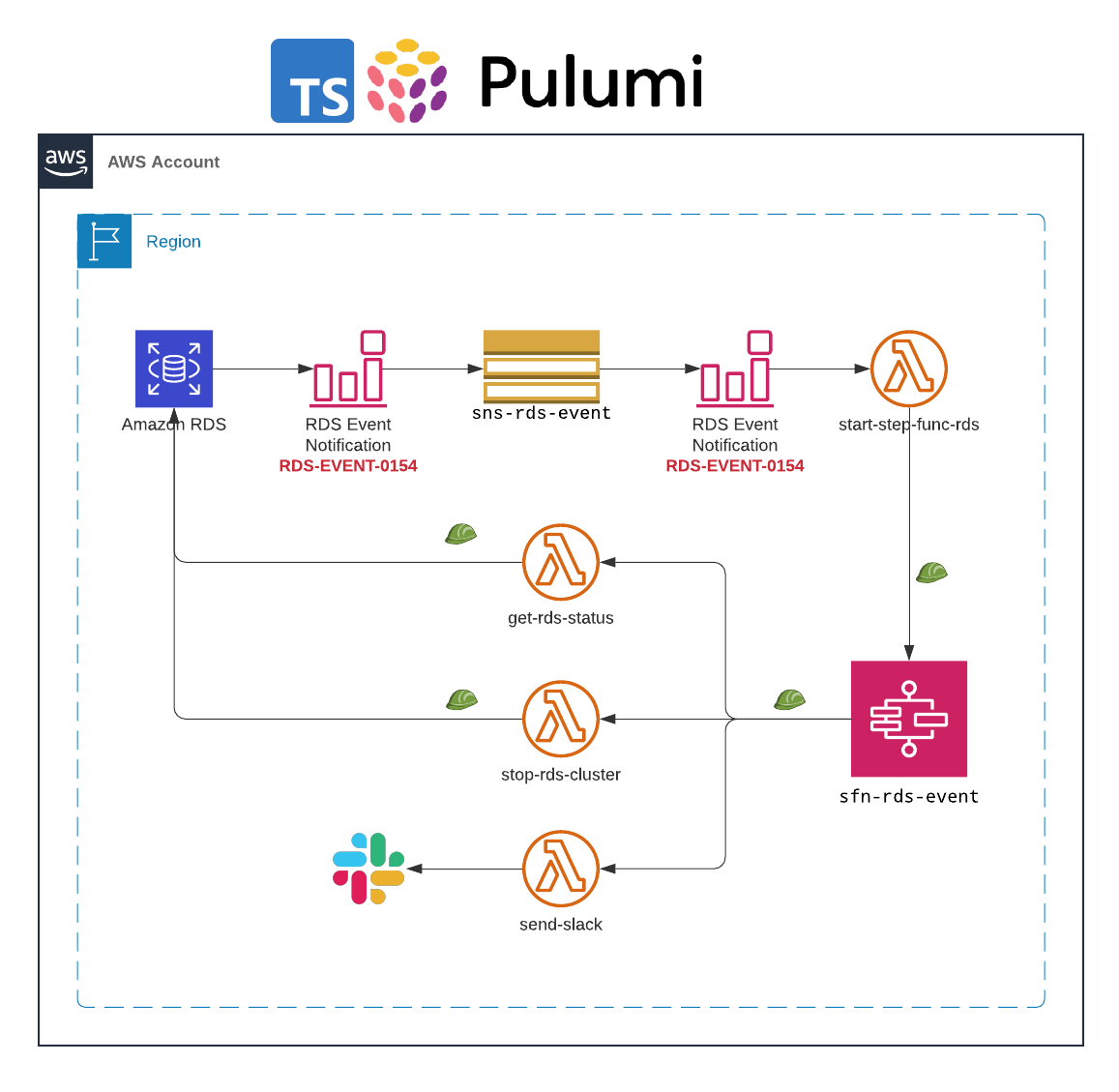
The solution relies on RDS event notifications. Once a stopped RDS instance is started by AWS due to exceeding the maximum time in the stopped state; an event (RDS-EVENT-0154) is generated by RDS.
The RDS event is pushed to a dedicated SNS topic
sns-rds-event.The Lambda function
start-step-func-rdsis subscribed to the SNS topicsns-rds-eventThe function filters messages with event code:
RDS-EVENT-0153(The DB cluster is being started due to it exceeding the maximum allowed time being stopped.), plus the function validates that the RDS instance is tagged withauto-restart-protectionand that the tag value is set toyes.Once all conditions are met, the Lambda function starts the AWS Step Functions state machine execution.
The AWS Step Functions state machine integrates with two Lambda functions in order to retrieve the instance state, as well as attempt to stop the RDS instance.
In case the instance state is not ‘available’, the state machine waits for 5 minutes and then re-checks the state.
Finally, when the Amazon RDS instance state is ‘available’; the state machine will attempt to stop the Amazon RDS instance.
Note: This blog is for handling RDS cluster with multiple intances, for single instance, catch
RDS-EVENT-0154: The DB instance is being started due to it exceeding the maximum allowed time being stopped.
Let's start writing IaC using Pulumi and typescript
🚀 Create RDS cluster with multiple instances
Create RDS cluster with one or more instances
Using the imported existing VPC (optional)
{% details rds.ts %}
import * as aws from "@pulumi/aws";

const vpc_sg = new aws.ec2.SecurityGroup("vpc_sg",
    {
        description: "Allows inbound and outbound traffic for all instances in the VPC",
        name: "vpc-sec",
        revokeRulesOnDelete: false,
        tags: {
            Name: "vpc-sec",
        }
    },
    {
        protect: true,
    }
);

export const rds_cluster = new aws.rds.Cluster('SelTestRdsEventSub', {
    //availabilityZones: ['ap-northeast-2a', 'ap-northeast-2c'],
    clusterIdentifier: 'my-test-rds-sub',
    engine: 'aurora-postgresql',
    masterUsername: 'postgres',
    masterPassword: '*****',
    dbSubnetGroupName: 'aws-test',
    databaseName: "mydb",
    skipFinalSnapshot: true,
    vpcSecurityGroupIds: [vpc_sg.id],
    tags: {
        'Name': 'my-test-rds-sub',
        'stack': 'pulumi-rds',
        'auto-restart-protection': 'yes'
    }
});

export const clusterInstances: aws.rds.ClusterInstance[] = [];

for (const range = {value: 0}; range.value < 1; range.value++) {
    clusterInstances.push(new aws.rds.ClusterInstance(`SelRdsClusterInstance-${range.value}`, {
        identifier: `my-test-rds-sub-${range.value}`,
        clusterIdentifier: rds_cluster.id,
        instanceClass: aws.rds.InstanceType.T3_Medium,
        engine: 'aurora-postgresql',
        engineVersion: rds_cluster.engineVersion,
        dbSubnetGroupName: 'aws-test',
        tags: {
            'Name': `my-test-rds-sub-${range.value}`,
            'stack': 'pulumi-rds-instance',
            'auto-restart-protection': 'yes'
        }
    }))
}
{% enddetails %}
🚀 Create SNS topic and subscribe event to the RDS cluster
Create a SNS topic to receive events from RDS cluster
Create event subscription:
Target: the SNS topic
Source Type: Clusters (and point to the cluster created from the above step)
Specific event categories:
notification
index.ts
import * as aws from "@pulumi/aws";
import { state_machine_handler } from "./stepFunc";
import { rds_cluster } from "./rds";


const sns_rds_event = new aws.sns.Topic('SnsRdsEvent', {
    displayName: 'sns-rds-event',
    name: 'sns-rds-event',
    tags: {
        'Name': 'sns-rds-event',
        'stack': 'plumi-sns'
    }
});

const rds_event_sub = new aws.rds.EventSubscription('RdsEventSub', {
    enabled: true,
    name: 'rds-event-sub',
    eventCategories: ['notification'],
    sourceType: 'db-cluster',
    sourceIds: [rds_cluster.id],
    snsTopic: sns_rds_event.arn,
    tags: {
        'Name': 'rds-event-sub',
        'stack': 'pulumi-event'
    }
});

const sns_sub = new aws.sns.TopicSubscription('sns-topic-event-sub', {
    endpoint: state_machine_handler.arn,
    protocol: 'lambda',
    topic: sns_rds_event.arn
});

sns_rds_event.onEvent('sns-lambda-trigger', state_machine_handler, sns_sub)
🚀 Create Lambda function which is subscribed to the SNS topic
The lambda function will be triggered by SNS topic whenever there's an event
The lambda function parses the event message to filter the event ID
RDS-EVENT-0153and checks the RDS cluster tag for key: valueauto-restart-protection: yes. If all conditions match, then the lambda function executes Step Functions state machineCreate IAM role which is consumed by lambda function
iam-role
export const allowRdsClusterRole = new aws.iam.Role("allow-stop-rds-cluster-role", {
    name: 'lambda-stop-rds-cluster',
    description: 'Role to stop rds cluster base on event',
    assumeRolePolicy: JSON.stringify({
        Version: "2012-10-17",
        Statement: [{
            Action: "sts:AssumeRole",
            Effect: "Allow",
            Sid: "",
            Principal: {
                Service: "lambda.amazonaws.com",
            },
        }],
    }),
    tags: {
        'Name': 'lambda-stop-rds-cluster',
        'stack': 'pulumi-iam'
    },
});

const rds_policy = new aws.iam.RolePolicy("allow-stop-rds-cluster", {
    role: allowRdsClusterRole,
    policy: {
        Version: "2012-10-17",
        Statement: [
            {
                Sid: "AllowRdsStatement",
                Effect: "Allow",
                Resource: "*",
                Action: [
                    "rds:AddTagsToResource",
                    "rds:ListTagsForResource",
                    "rds:DescribeDB*",
                    "rds:StopDB*"
                ]
            },
            {
                Sid: "AllowSfnStatement",
                Effect: "Allow",
                Resource: "*",
                Action: "states:StartExecution"
            },
            {
                Sid: 'AllowLog',
                Effect: 'Allow',
                Resource: "arn:aws:logs:*:*:*",
                Action: [
                    "logs:CreateLogGroup",
                    "logs:CreateLogStream",
                    "logs:PutLogEvents"
                ],
            }
        ]
    },
}, {parent: allowRdsClusterRole});
- Create a lambda function which is a subscription of the SNS topic
start-step-func-lambda
export const state_machine_handler = new aws.lambda.Function('RdsSNSEvent',
    {
        code: new pulumi.asset.FileArchive('lambda-code/start-statemachine-execution-lambda/handler.tar.gz'),
        description: 'Lambda function listen to RDS SNS event topic to trigger step function',
        name: 'start-step-func-rds',
        handler: 'app.handler',
        runtime: aws.lambda.Runtime.Python3d8,
        role: handler.allowRdsClusterRole.arn,
        environment: {
            variables: {
                'STEPFUNCTION_ARN': stepFunction.arn
            }
        },
        tags: {
            'Name': 'start-step-func-rds',
            'stack': 'pulumi-lambda'
        }
    },
    {
        dependsOn: [handler.allowRdsClusterRole]
    }
);
- Create step function state machine with flowing definitions
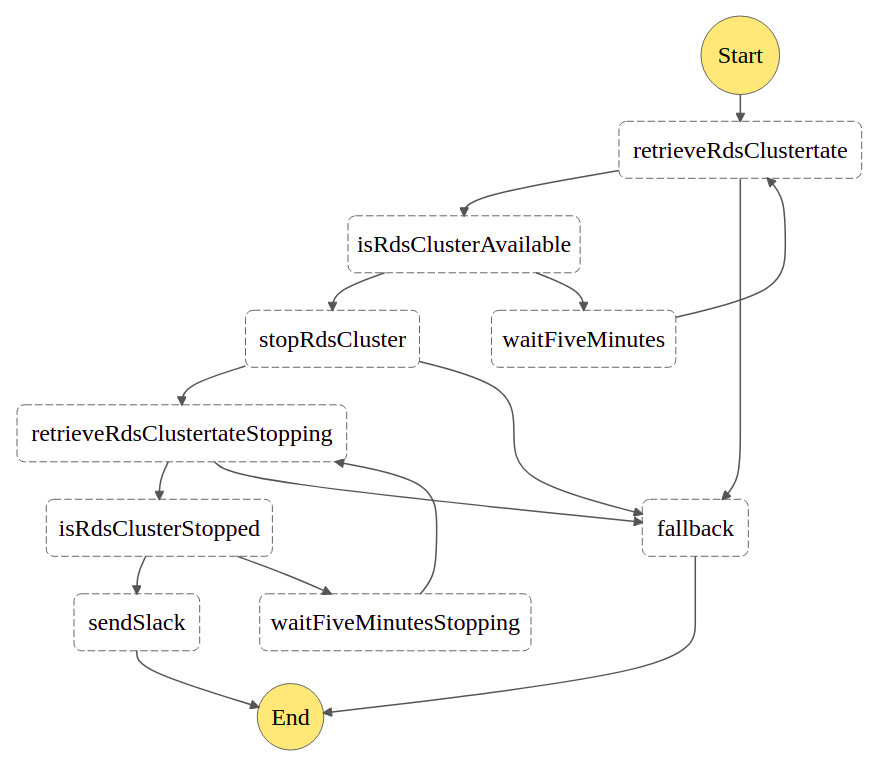
stepFunc.ts
import * as aws from '@pulumi/aws';
import * as pulumi from '@pulumi/pulumi';
import * as handler from './handler';


export const stepFunction = new aws.sfn.StateMachine('SfnRdsEvent', {
    name: 'sfn-rds-event',
    roleArn: handler.sfn_role.arn,
    tags: {
        'Name': 'sfn-rds-event',
        'stack': 'pulumi-sfn'
    },
    definition: pulumi.all([handler.retrieve_rds_status_handler.arn, handler.stop_rds_cluster_handler.arn, handler.send_slack_handler.arn])
        .apply(([retrieveArn, stopRdsArn, sendSlackArn]) => {
        return JSON.stringify({
            "Comment": "RdsAutoRestartWorkFlow: Automatically shutting down RDS instance after a forced Auto-Restart",
            "StartAt": "retrieveRdsClustertate",
            "States": {
                "retrieveRdsClustertate": {
                    "Type": "Task",
                    "Resource": retrieveArn,
                    "TimeoutSeconds": 5,
                    "Retry": [
                        {
                        "ErrorEquals": [
                            "Lambda.Unknown",
                            "States.TaskFailed"
                        ],
                        "IntervalSeconds": 3,
                        "MaxAttempts": 2,
                        "BackoffRate": 1.5
                        }
                    ],
                    "Catch": [
                        {
                        "ErrorEquals": [
                            "States.ALL"
                        ],
                        "Next": "fallback"
                        }
                    ],
                    "Next": "isRdsClusterAvailable"
                },
                "isRdsClusterAvailable": {
                    "Type": "Choice",
                    "Choices": [
                        {
                        "Variable": "$.readyToStop",
                        "StringEquals": "yes",
                        "Next": "stopRdsCluster"
                        }
                    ],
                    "Default": "waitFiveMinutes"
                },
                "waitFiveMinutes": {
                    "Type": "Wait",
                    "Seconds": 300,
                    "Next": "retrieveRdsClustertate"
                },
                "stopRdsCluster": {
                    "Type": "Task",
                    "Resource": stopRdsArn,
                    "TimeoutSeconds": 5,
                    "Retry": [
                        {
                        "ErrorEquals": [
                            "States.Timeout"
                        ],
                        "IntervalSeconds": 3,
                        "MaxAttempts": 2,
                        "BackoffRate": 1.5
                        }
                    ],
                    "Catch": [
                        {
                        "ErrorEquals": [
                            "States.ALL"
                        ],
                        "Next": "fallback"
                        }
                    ],
                    "Next": "retrieveRdsClustertateStopping"
                },
                "retrieveRdsClustertateStopping": {
                    "Type": "Task",
                    "Resource": retrieveArn,
                    "TimeoutSeconds": 5,
                    "Retry": [
                        {
                        "ErrorEquals": [
                            "States.Timeout"
                        ],
                        "IntervalSeconds": 3,
                        "MaxAttempts": 2,
                        "BackoffRate": 1.5
                        }
                    ],
                    "Catch": [
                        {
                        "ErrorEquals": [
                            "States.ALL"
                        ],
                        "Next": "fallback"
                        }
                    ],
                    "Next": "isRdsClusterStopped"
                },
                "isRdsClusterStopped": {
                    "Type": "Choice",
                    "Choices": [
                        {
                        "Variable": "$.rdsClusterStatus",
                        "StringEquals": "stopped",
                        "Next": "sendSlack"
                        }
                    ],
                    "Default": "waitFiveMinutesStopping"
                },
                "waitFiveMinutesStopping": {
                    "Type": "Wait",
                    "Seconds": 300,
                    "Next": "retrieveRdsClustertateStopping"
                },
                "sendSlack": {
                    "Type": "Task",
                    "Resource": sendSlackArn,
                    "TimeoutSeconds": 5,
                    "End": true
                },
                "fallback": {
                    "Type": "Task",
                    "Resource": sendSlackArn,
                    "TimeoutSeconds": 5,
                    "End": true
                }
            }
        });
    })
});
🚀 Create lambda function to retrieve RDS cluster and instances status
retrieve-rds-status.ts
export const retrieve_rds_status_handler = new aws.lambda.Function('RetrieveRdsStateFunc', {
    code: new pulumi.asset.FileArchive('lambda-code/retrieve-rds-instance-state-lambda/handler.tar.gz'),
    description: 'Lambda function to retrieve rds instance status',
        name: 'get-rds-status',
        handler: 'app.handler',
        runtime: aws.lambda.Runtime.Python3d8,
        role: allowRdsClusterRole.arn,
        tags: {
            'Name': 'get-rds-status',
            'stack': 'pulumi-lambda'
        }
});
{% enddetails %}
🚀 Create lambda function to stop RDS cluster
{% details stop-rds.ts %}
export const stop_rds_cluster_handler = new aws.lambda.Function('StopRdsClusterFunc', {
    code: new pulumi.asset.FileArchive('lambda-code/stop-rds-instance-lambda/handler.tar.gz'),
    description: 'Lambda function to retrieve rds instance status',
        name: 'stop-rds-cluster',
        handler: 'app.handler',
        runtime: aws.lambda.Runtime.Python3d8,
        role: allowRdsClusterRole.arn,
        tags: {
            'Name': 'stop-rds-cluster',
            'stack': 'pulumi-lambda'
        }
});
🚀 Create lambda function to send slack
send-slack.ts
export const send_slack_handler = new aws.lambda.Function('SendSlackFunc', {
    code: new pulumi.asset.FileArchive('lambda-code/send-slack/handler.tar.gz'),
    description: 'Lambda function to send slack',
        name: 'rds-send-slack',
        handler: 'app.handler',
        runtime: aws.lambda.Runtime.Python3d8,
        role: allowRdsClusterRole.arn,
        tags: {
            'Name': 'rds-send-slack',
            'stack': 'pulumi-lambda'
        }
});
🚀 SFN IAM role to trigger lambda functions
sfn-role.ts
export const sfn_role = new aws.iam.Role('SfnRdsRole', {
    name: 'sfn-rds',
    description: 'Role to trigger lambda functions',
    assumeRolePolicy: JSON.stringify({
        Version: "2012-10-17",
        Statement: [{
            Action: "sts:AssumeRole",
            Effect: "Allow",
            Sid: "",
            Principal: {
                Service: "states.ap-northeast-2.amazonaws.com",
            },
        }],
    }),
    tags: {
        'Name': 'sfn-rds',
        'stack': 'pulumi-iam'
    }
});
🚀 Pulumi deploy stack

🚀 Conclusion
We now can save time and save money with this solution. Plus, we will receive a slack message when there're events
Although Pulumi Supports Many Clouds and provisioners and can visualise the resources chart within the stack there're more options such as AWS Cloud Development Kit (CDK)
Ref: Field Notes: Stopping an Automatically Started Database Instance with Amazon RDS